
Before you start
Plan Your Content!
Think about what do you want to tell the world. Then make a plan.
The Audience
Think about:
- What you want to say?
- Who do you want to say it to “who is your audience”?
- children? adults? elderly folk?
- do they already know something about the thing, or is it brand new to them
Fot his site the audience is:
Make an Outline
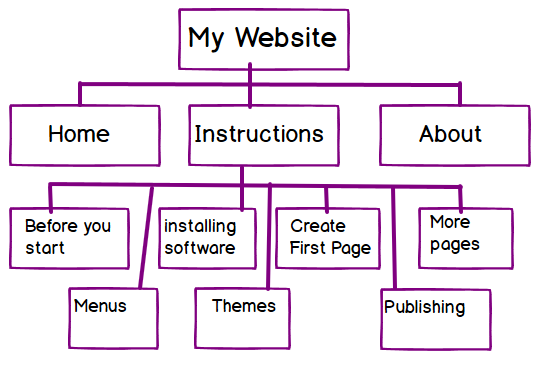
Perhaps start with an outline, a tree of pages that you think you will need. For example for this site: You could make a simple nested list.
- Home Page (Welcome)
- Instructions
- Before you start
- Installing the software
- Creating your first page
- More Pages
- Making the menu
- Add a Theme (What it looks like)
- Publishing to the Web
- About
Or draw a tree of boxes:
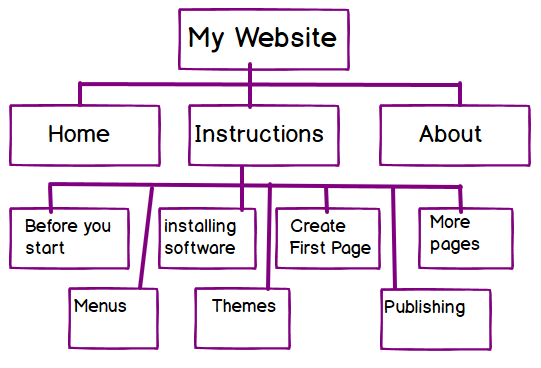
You can do this on paper if it is easier
Don’t worry about making it perfect. You can always change your mind one you have started, even after publishing.
Words & Pictures
While websites can contain all sorts of different things (Videos, games, discussions, and more). For your first site you may find it easier to stick to words and pictures.
Remmeber to think about the audience of each page:
- What you want to tell them?
- Will they understand what you are saying
- do you need to explain things in more or less detail?
- Will pictures help?
Start writing
Get your content together. You don’t need to write directly in to the web publishing software. you can use a word processor or note taking application. For your first website we will need the following inforamtion for each page:
- Title
- i.e the bit at the top: “Before you start” for this page
- The “Body”
- that’s the main set of words on page, you are reading them now!
- and any pictures/images that you want to show the reader or pictures that are need to help the reader understand what you are saying.
- if you have lots of images these can be put in an image gallery so the user can flip through them on a single page
- Featured Image (optional)
- a picture you think represents the page. It will be used in the page header and possibly in any links to it
- Content images (optional)
- one or more